
This page is specific to R. It shows how to use the Tree View
callbacks of the MUI docs, such as onSelectedItemsChange
and onItemClick,
in a Shiny app.
The examples need a Shiny server, so they are not run on this page: copy them into an R session to try them.
Send a value to Shiny with setInput()
Tree View callbacks are JavaScript functions.
setInput(inputId, 1) creates one that sends an argument of
the callback to input[[inputId]]. The 1 is the
position of the argument, starting from 0: most callbacks receive the
event first (position 0), then the ids (position 1).
| Callback | Arguments | Example |
|---|---|---|
onItemClick |
event, item id | setInput("clicked", 1) |
onSelectedItemsChange |
event, selected ids | setInput("selected", 1) |
onExpandedItemsChange |
event, expanded ids | setInput("expanded", 1) |
onItemFocus |
event, item id | setInput("focused", 1) |
onItemLabelChange |
item id, new label | see Label editing |
Filter a data frame with the selection
The most common use: build the tree from a data frame with
asMuiTree(), and filter the data frame with the selected
ids. Use levels_id so that the ids are stable and can be
matched with the data frame. MUI
docs
library(shiny)
library(muiMaterial)
library(muiTreeView)

to_id <- function(x) gsub("[^a-z0-9]+", "-", tolower(x))

fns <- rbind(
  data.frame(package = "muiMaterial", group = "Layout", fn = c("Box", "Stack", "Grid")),
  data.frame(package = "muiMaterial", group = "Inputs", fn = c("Button", "TextField", "Slider", "Switch")),
  data.frame(package = "muiMaterial", group = "Navigation", fn = c("Link", "Tabs", "Drawer")),
  data.frame(package = "muiMaterial", group = "Surfaces", fn = c("AppBar", "Toolbar", "Card")),
  data.frame(package = "muiCharts", group = "Charts", fn = c("BarChart", "LineChart", "PieChart", "Gauge")),
  data.frame(package = "muiCharts", group = "Building blocks", fn = c("ChartsContainer", "ChartsXAxis", "ChartsLegend", "Toolbar")),
  data.frame(package = "reactRouter", group = "Routers", fn = c("RouterProvider", "createHashRouter", "createMemoryRouter")),
  data.frame(package = "reactRouter", group = "Routes", fn = c("Route", "Outlet")),
  data.frame(package = "reactRouter", group = "Navigation", fn = c("Link", "NavLink", "Navigate")),
  data.frame(package = "reactRouter", group = "Hooks", fn = c("useParams", "useLoaderData", "useNavigate"))
)
# Stable ids, built from the path: "Navigation", "Link" and "Toolbar" exist in two packages
fns$group_id <- paste(fns$package, to_id(fns$group), sep = "-")
fns$fn_id <- paste0(fns$package, "::", fns$fn)

fn_items <- asMuiTree(
  fns,
  levels = c("package", "group", "fn"),
  levels_id = c("package", "group_id", "fn_id")
)

ui <- muiMaterialPage(
  CssBaseline(),
  Stack(
    direction = "row",
    spacing = 2,
    sx = list(p = 2),
    Box(
      sx = list(minWidth = 280),
      RichTreeView(
        items = fn_items,
        checkboxSelection = TRUE,
        multiSelect = TRUE,
        selectionPropagation = list(descendants = TRUE, parents = TRUE),
        defaultExpandedItems = list("muiCharts"),
        onSelectedItemsChange = setInput("selected", 1)
      )
    ),
    Box(tableOutput("table"))
  )
)

server <- function(input, output, session) {
  output$table <- renderTable({
    # Selecting a package or a group selects its functions, thanks to
    # selectionPropagation; keep only the rows of the selected functions.
    fns[fns$fn_id %in% input$selected, c("package", "group", "fn")]
  })
}

shinyApp(ui, server)
Track the latest item clicked
With onItemClick, Shiny receives the id of each clicked
item, even if the selection doesn’t change. MUI
docs
library(shiny)
library(muiTreeView)

fns <- data.frame(
  package = c("muiMaterial", "muiMaterial", "muiCharts", "muiCharts", "reactRouter", "reactRouter"),
  fn = c("Button", "Drawer", "BarChart", "PieChart", "Route", "NavLink")
)

ui <- tagList(
  RichTreeView(
    items = asMuiTree(fns),
    onItemClick = setInput("clicked", 1)
  ),
  verbatimTextOutput("clickedLabel")
)

server <- function(input, output, session) {
  output$clickedLabel <- renderPrint({
    req(input$clicked)
    # Without levels_id, asMuiTree() creates ids as "<label>-<random number>":
    # remove the number to get the label back.
    gsub("-[[:digit:]]*$", "", input$clicked)
  })
}

shinyApp(ui, server)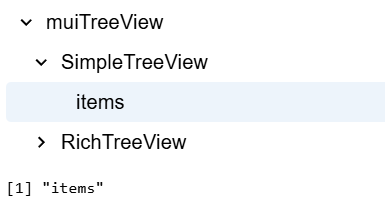
Track the expansion
RichTreeView(
  items = fn_items,
  onExpandedItemsChange = setInput("expanded", 1)
)
# server: input$expanded contains the ids of the expanded items
React to an event with triggerEvent()
When the server only needs to know that something happened, not the
value, use triggerEvent() with
observeEvent():
library(shiny)
library(muiTreeView)

ui <- tagList(
  SimpleTreeView(
    onExpandedItemsChange = triggerEvent("expansionChanged"),
    TreeItem(
      itemId = "muiCharts",
      label = "muiCharts",
      TreeItem(itemId = "muiCharts::BarChart", label = "BarChart()")
    ),
    TreeItem(
      itemId = "reactRouter",
      label = "reactRouter",
      TreeItem(itemId = "reactRouter::Route", label = "Route()")
    )
  ),
  verbatimTextOutput("count")
)

server <- function(input, output, session) {
  n <- reactiveVal(0)
  observeEvent(input$expansionChanged, n(n() + 1))
  output$count <- renderText(paste("Expansion changes:", n()))
}

shinyApp(ui, server)
Controlled state from the server
To change the selection or the expansion from the server, render the
tree on the server with renderReact() and
reactOutput(), and pass the state with
selectedItems or expandedItems. Keep the state
in a reactiveVal() that is also updated when the user
clicks on the tree. MUI
docs
library(shiny)
library(muiMaterial)
library(muiTreeView)

fns <- data.frame(
  package = c("muiMaterial", "muiMaterial", "muiCharts", "muiCharts", "reactRouter", "reactRouter"),
  fn = c("Button", "Drawer", "BarChart", "PieChart", "Route", "NavLink")
)
fns$fn_id <- paste0(fns$package, "::", fns$fn)
fn_items <- asMuiTree(fns, levels = c("package", "fn"), levels_id = c("package", "fn_id"))

ui <- muiMaterialPage(
  CssBaseline(),
  Box(
    sx = list(p = 2, maxWidth = 400),
    Stack(
      direction = "row",
      spacing = 1,
      Button.shinyInput("selectCharts", "Select muiCharts", variant = "outlined"),
      Button.shinyInput("clear", "Clear", variant = "outlined")
    ),
    reactOutput("tree")
  )
)

server <- function(input, output, session) {
  selected <- reactiveVal(list())

  # From the user to the server
  observeEvent(input$selected, selected(input$selected), ignoreNULL = FALSE)

  # From the server to the tree
  observeEvent(input$selectCharts, {
    selected(as.list(fns$fn_id[fns$package == "muiCharts"]))
  })
  observeEvent(input$clear, selected(list()))

  output$tree <- renderReact({
    RichTreeView(
      items = fn_items,
      checkboxSelection = TRUE,
      multiSelect = TRUE,
      defaultExpandedItems = list("muiCharts"),
      selectedItems = selected(),
      onSelectedItemsChange = setInput("selected", 1)
    )
  })
}

shinyApp(ui, server)
Track multiple items with checkbox selection
onItemSelectionToggle sends the id of the item that was
just toggled. To keep the list of the selected items on the server, add
or remove the received id. This reproduces the logic of the MUI
docs. In most apps, onSelectedItemsChange, used above,
is simpler.
library(shiny)
library(muiTreeView)

fns <- data.frame(
  package = c("muiMaterial", "muiMaterial", "muiCharts", "muiCharts", "reactRouter", "reactRouter"),
  fn = c("Button", "Drawer", "BarChart", "PieChart", "Route", "NavLink")
)
treeItems <- asMuiTree(fns)

ui <- tagList(
  RichTreeView(
    checkboxSelection = TRUE,
    multiSelect = TRUE,
    items = treeItems,
    defaultExpandedItems = list(treeItems[[1]]$id),
    onItemSelectionToggle = setInput("itemSelection", 1)
  ),
  verbatimTextOutput("treeLabel")
)

server <- function(input, output, session) {
  selectedItems <- reactiveVal(character())

  observeEvent(input$itemSelection, {
    id <- input$itemSelection
    if (id %in% selectedItems()) {
      selectedItems(setdiff(selectedItems(), id))
    } else {
      selectedItems(c(selectedItems(), id))
    }
  })

  output$treeLabel <- renderPrint(gsub("-[[:digit:]]*$", "", selectedItems()))
}

shinyApp(ui, server)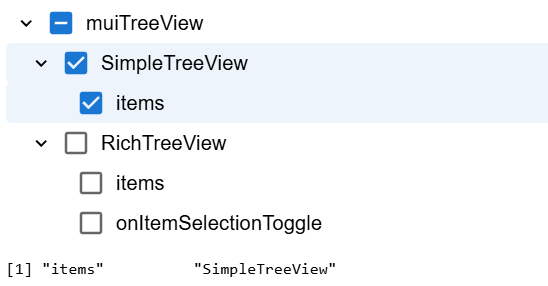
Navigation
To use a tree view as the navigation of a multi-page Shiny app, see reactRouter.
Runnable examples
Every exported function has a runnable Shiny example:
list.files(system.file("examples", package = "muiTreeView"))
source(system.file("examples/RichTreeView.R", package = "muiTreeView"))
Security notes
- Values sent to Shiny with
setInput(),triggerEvent()orShiny.setInputValue()come from the browser and can be forged. Restrictions such asisItemEditableor disabled items only apply to the user interface, so validate the received ids and labels on the server, for example withreq(input$selected %in% fns$fn_id). -
JS()code runs in the browser of every visitor. Only pass fixed code to it; never build the string withpaste0()orglue()from user input, URL parameters, files or databases. Put the data in theitems(or other arguments) and read it inside the function, e.g.getItemLabel = JS("(item) => item.name"). To embed values computed from your own data, such as a list of ids, serialize them withjsonlite::toJSON(), which escapes them, as in Rich Tree View - Items. - Labels given as plain strings are escaped. Never wrap untrusted text
in
HTML(), which is rendered as markup.